2015 was the year that brought some new possibilities for automation on mobile platforms, especially on iOS. The beginning of 2016 is a good moment to tweak our workflows and make them even more effective.
In this blogpost, I will show you a few examples of how these automation tools can work with Nozbe. Thanks to our email integration, hashtags and Markdown support we can do some really cool stuff. Here goes:
We regularly introduce Nozbe users from all over the world. Today, we visit Spain to meet Pedro Rodinger and learn his way of dealing with his professional objectives in Nozbe.
Who is Pedro? My name is Pedro Rodinger, I’m a manager with more than 20 years of experience in the field of finance and accounting on the one hand and industrial property on the other hand. I work in an international environment with particular emphasis on organization, implementation of IT systems and managing staff.
On behalf of the entire Nozbe team, I’d like to wish you a Merry Christmas and a Happy and a Productive 2016 - may your dreams and goals come true and may the new year be your best ever!
Free Gift - The “Lite” Book of Nozbe!
This year I’d like to extend these wishes with a gift from our Nozbe community contributor, customer and productivity expert: Marcus Platt, who wrote the ultimate Nozbe user’s manual called “The Little Book of Nozbe” where he explains how to get most of Nozbe from a user’s point of view.
Nozbe 2.5 for Android now features Quick Add notification which allows for quick task adding from any screen on your device without opening Nozbe app itself. All you have to do is pull down the notification bar, tap on the always visible “Add task to Nozbe” notification and enter task name. Oh, and you can also specify any Project, Category or delegation using hashtag notation. We think this is a big deal and if you want to know why, you should really read this post.
One of the questions I keep getting is why I named my productivity product “Nozbe”? It doesn’t mean anything in English… so why this name? Maybe it means something in some other language? Well, not really… so in this post let me share the story behind the Nozbe name with you…
Nozbe = To BE Naturally OrganiZed When I was in college, back in 2000, me and my friend Wiktor were dreaming of running an Internet company some day and changing the world.
A few months ago, we’ve decided to double down our efforts on Apple platforms. Many of us at Nozbe are happy users of Macs and iOS devices, and so we wanted to bring more features, improvements and refinements to our apps there.
You might have noticed the results over the last few versions. We released one of the first apps for Apple Watch, then redesigned it just two months later. And in the lastest version, Mac users got a Today widget (just like the one we have on iOS).
But we’re just getting started. We have a ton of improvements in the pipeline. Here’s just a few examples of what we’re working on for the iOS 9 release in September:
Multi-tasking on iPad
If you’re on an iPad, you’ll love this one. In iOS 9, you can swipe your finger from the right edge of the screen to see your tasks in Nozbe. You don’t have to leave the app you’re using, go to home screen or double-tap the home button. Just swipe from the right and you can slide Nozbe over other apps. This is useful when you just want a quick glance at your priority tasks, or when you want to quickly add a task to your inbox.
It gets even better if you’re using iPad Air 2. After sliding Nozbe over, you can drag the separator to enable split view. This way, you can use Nozbe side-by-side with another app. For example, you can compose an email while looking at your notes in Nozbe.
Did you know that Nozbe can help you build a new habit? Let’s take learning a foreign language as an example. Who wouldn’t like to speak an extra one, huh? Say… French…
Before you start
Scientific researches have found certain mechanisms that rule the process of creating a habit. Based on that, we can formulate a couple of tips that will help you take off.
Set a big goal - have your vision of what you want to achieve and why. Talk to yourself for a while and make sure that learning a new language is something you really want and need.
Make it so easy you can’t say no. — Leo Babauta - start approaching your big goal with tiny steps. Try setting the tasks easy enough so that you can get it done without motivation (that is kind of moody and differs depending on a day, weather and other circumstances.)
Building sticky habits is a lot easier if you make use of the routines you already have rather than try to fight or modify them. It’s good to build your plan around triggers that will let you know that it’s time to work on your habit, e.g.: after I get up and have a glass of water I learn French.
When you fail, get back on track as quickly as possible. Don’t worry! Missing your habit once or twice, no matter at what stage it occurs, has no serious impact on your long-term progress. Instead of trying to be perfect, be good and compassionate to yourself. You’re doing a great job!
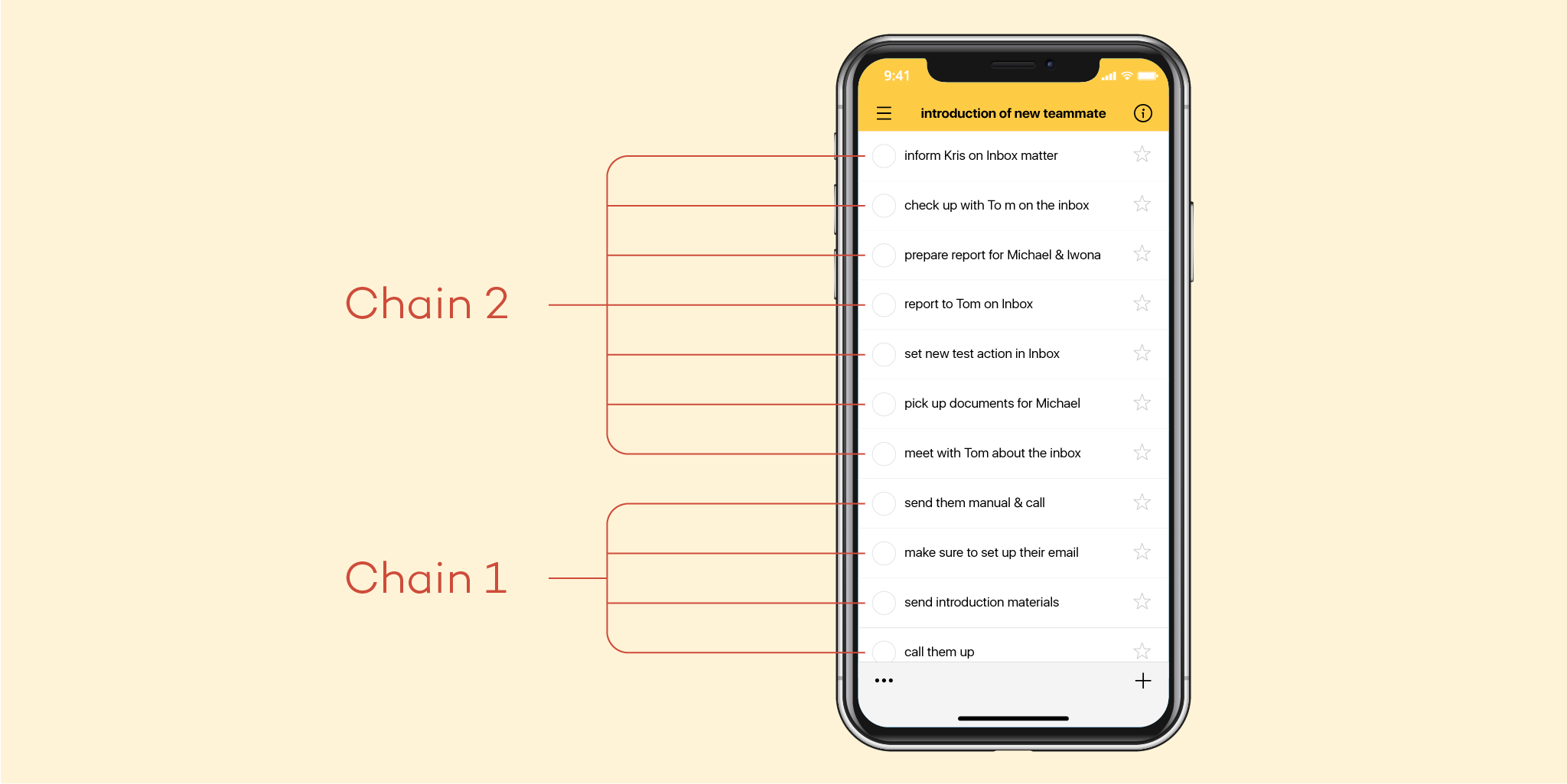
Quite often we come across a very particular set of tasks. I like to call them chain tasks, as they act as if they were a silver chain, one following the other.
To put it in simple terms, chain tasks are a group of consecutive tasks that need to be done in certain order and most often task B, C, D can’t be done without having A completed.
What can be done with them in Nozbe?
It is true that Nozbe does not have a direct/to-the-point option for them. Having been asked about them frequently, and having tried my best to work around that lack, I came up with and idea, that although not ideal, seems to work well.
Although the contrary situation is way more frequent, once in a while it is time to leave some shared project. When that time comes, questions arise.
Who can leave?
How can you leave a project?
What information will be retained on the leaving account?
This post will answer those for you.
Who can leave a project?
Essentially, anyone can. However, if your are the one who created the project the only way you can do so is by first requesting the ownership thereof to be transfered to someone else. You can of course simply complete it or delete… but that’s not the answer in some cases, such as leaving one company for another.
So, the owner can’t simply leave.
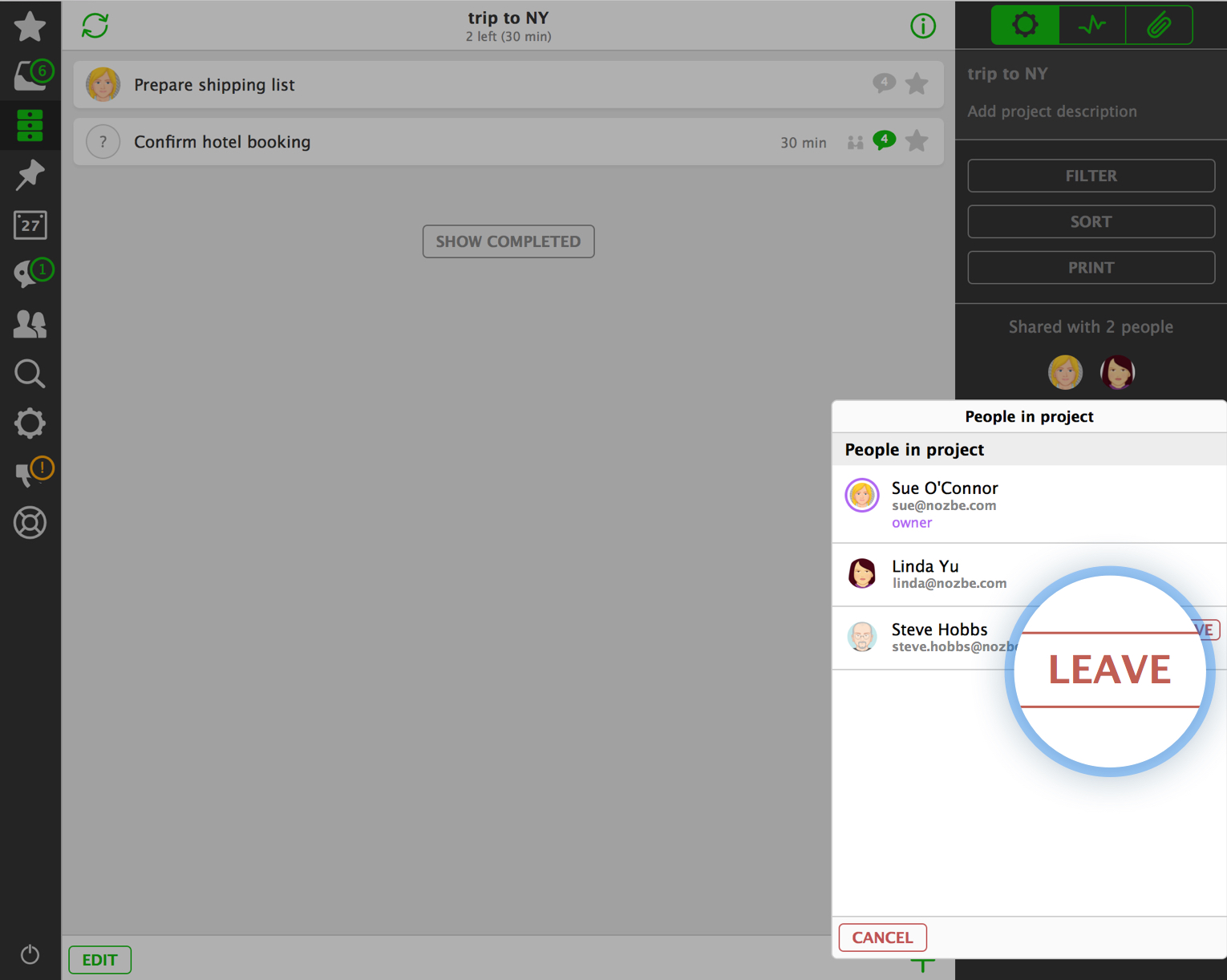
Anyone else can leave a project they have been invited to without any problem. To do so, go to given project, use the “i” icon at the top bar, click on the list of people in the project, pick yourself and use the “…” icon next to your name. Then “leave the project”.
Grouping projects is one of the most vital and tricky aspects of day-to-day project and time management. Properly arranged groups can boost your productivity while a mess in the list can defeat the purpose of use of any system at all.
Labels
I guess everyone can imagine the most basic use thereof… simply create some, add them to projects and later on, filter by them. Yet, a second use that not so many are familiar with is… sub-projects.
Yes, you read it right… sub-projects. True, Nozbe does not have sub-projects. However, none said that you can’t turn your goal into a label; a complex task into a project and sub-tasks you had in mind - into actual tasks.
Two things to remember:
You can filter by a label narrowing your list of projects only to those with that given one.
You can have more than one label attached to a project (so it can indeed be grouped by a goal + something else)
I for instance, have some fixed and unchangeable labels such as work, home, study, private. All my projects are grouped initially into those areas. Then, I have other sort of labels. Those are actual goals such as: affiliate, support and other - all for work; home related tend to be shopping, improvements; private - craft, travel.